I worry sometimes that people don't know what tools they have online to find things, so here's one I use often that can be easy to ignore if you're not used to using it. My background image is a cloudy sky I found by filtering the image search to only show me images in the public domain, meaning anyone can use them. Here's what that looks like:
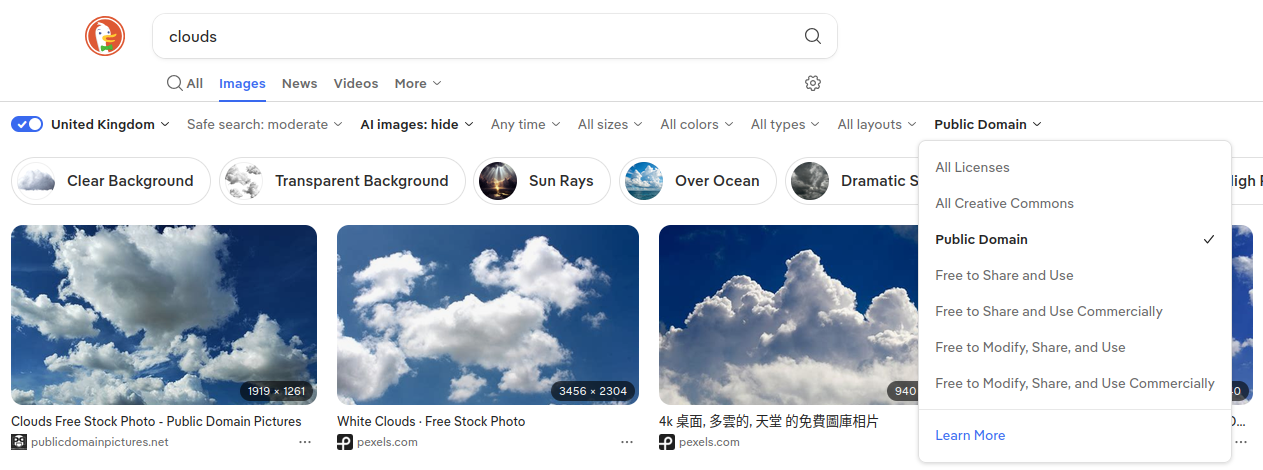
I have AI images hidden but I honestly don't even trust that these days. Google is a lost cause for me, especially for image searching - I think you'd have better luck with something else (like Firefox with Duckduckgo as the search engine, like I use). Just because it's more difficult to find useable images and reliable references online, doesn't mean they're not out there. It's important to look at the licence of the image you've found online to make sure you're able to use it for whatever you like without trouble. It's also just nice to know where things come from.
This one comes in handy for research of any kind. If you right click on any webpage and click 'inspect' you can see that the 'inspector' comes up at the bottom, showing you the site's HTML. The option after that, 'console', is what you're looking for. Click on that and type 'document.lastModified' and hit enter. There you go! There's a lot of helpful things to do in the terminal but that's the one I've become mad with power over. I'm looking at the lastmodified on every website now. Why not?

You can also open the terminal directly with the shortcut 'ctrl+shift+k' but I'm very selective about what shortcuts I end up using. I just right click. Sue me.
Please don't sue me.
You can also look at the code of any website your heart desires in big form by right clicking and selecting 'view page source' which comes in handy when you're getting into html yourself.